 Campfire SMS
Install the Campfire SMS plugin in ChatGPT and connect it to your verified phone. ChatGPT can then text you short updates and questions, and read your text replies. In an ordinary chat, ChatGPT reads your reply the next time it checks. In a Work chat, it can subscribe to your replies, so a text you send picks the task back up while you’re away.
ChatGPT task
SMS OUTThree quotes are in. Vendor B leaves out onboarding ($1,200). Add it to B’s total, or list it separately?
SMS INAdd it to the total.
RESULTUpdated. With onboarding included, Vendor A is cheapest over 12 months.
Your phone
Campfire SMS: Three quotes are in. Vendor B leaves out onboarding ($1,200). Add it to B’s total, or list it separately?
You: Add it to the total.
Campfire SMS: Updated. With onboarding included, Vendor A is cheapest over 12 months. Details are in ChatGPT.
Watch the setup
The video loads from YouTube when you press play.
What the Campfire SMS plugin does
ChatGPT does the work. Campfire SMS carries the texts. The plugin gives ChatGPT five tools: open a bridge to your phone, send a text, check for replies, mark a reply handled, and close the bridge. ChatGPT uses them based on what you ask.
- Updates at milestones: “Draft is ready.” “Found 14 matches.” “Done.”
- Questions that need you: one decision per text, answered in plain words.
- Results while you’re away from the screen, in the same inbox as your other texts.
Texts come from (608) 422-4987 and start with “Campfire SMS:”. No app to install on your phone.
Ordinary chat vs Work
The plugin works in both. The difference is what happens when you reply while ChatGPT isn’t working on the task.
| Ordinary chat | Work chat | |
|---|---|---|
| ChatGPT texts you | Yes | Yes |
| ChatGPT reads your replies | When it next checks, usually after you send it a message in the chat | When it checks, and when a reply event arrives |
| Your reply resumes the task by itself | No | Yes, once the task subscribes to your SMS replies |
| Good for | Short tasks you’ll come back to | Longer tasks you want to keep moving while you’re away |
Reply wake uses MCP events, which OpenAI documents for Work chats on ChatGPT web and in the desktop app with Cloud selected. Whether your account has plugins, Work, and events depends on your ChatGPT plan, workspace, and rollout.
Set it up
- Create a free Campfire SMS account with a US or Canadian mobile number, and choose a six-digit PIN.
- Open Campfire SMS in ChatGPT and install it. You can also search for it under Plugins (or Apps, depending on your account).
- Choose Connect, sign in with your phone number and PIN, and approve the connection.
- In a chat, type @Campfire SMS and ask it to text you a test. Reply from your phone.
No install command, Node.js, or Python. The step-by-step ChatGPT guide has screenshots, the Work setup, and fixes for common problems.
The “Allow ChatGPT to use Campfire SMS?” prompt
A sent text can’t be taken back, so ChatGPT asks before Campfire SMS sends one.
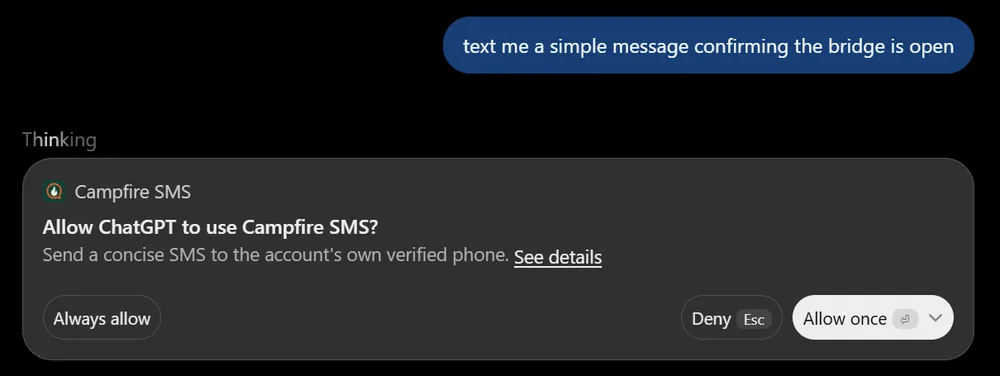
If you plan to step away, choose Always allow so a text doesn’t wait on a click you aren’t there to make. Choose Allow once if you’d rather approve each text. ChatGPT decides how long that choice lasts, and workspace settings can also control when it asks.
Allowing a text is not the same as approving the task. Your replies steer work ChatGPT is already doing. They don’t grant new permissions or answer ChatGPT’s other approval prompts.
What to ask ChatGPT
Use Campfire SMS. Text me when you need a decision or when you’re done. Keep texts short.
Use Campfire SMS. When I reply by SMS, retrieve my reply and continue this task. (Work chats)
Text me the three options in one message and wait for my pick.
Ask for one decision per text. Your reply has to fit in one text: 160 characters, or 70 if it includes an emoji.
Pricing and availability
Start with 20 free messages after you verify your phone. No card required. Each text sent or received counts as one message. After that, buy a one-time pack (150 for $5, 350 for $10, 800 for $20, or 2,200 for $40; purchased credits never expire) or use the monthly plan. See pricing.
Campfire SMS works with US and Canadian mobile numbers for now.
Plugins and Work are ChatGPT features. Whether your account has them depends on your ChatGPT plan and workspace.
Privacy
ChatGPT never gets your phone number. When it checks for replies, Campfire SMS returns the reply text, when it arrived, and message IDs. A reply event sent to a Work task carries IDs only; the task then fetches the text through its signed-in connection.
SMS isn’t end-to-end encrypted. Keep passwords, codes, and payment details out of texts. See the privacy policy.
Common questions
Can ChatGPT text me?
Yes, with the Campfire SMS plugin. ChatGPT sends the text through Campfire SMS to the phone number you verified. It can only text that one number, which is yours.
Can I text ChatGPT to start a new chat?
No. ChatGPT has to open the bridge from a chat or Work task first. A text sent while no bridge is open gets an automatic “No agent bridge is connected” reply. If you want a text to start work from scratch, Grok Bot with webhook wake does that.
Do I have to keep ChatGPT open to get my reply?
In an ordinary chat, ChatGPT reads your reply when it next checks, usually after you come back and send it a message. In a Work chat that has subscribed to your SMS replies, your text arrives as an event and the task continues without you reopening it.
Which ChatGPT plans can use the Campfire SMS plugin?
OpenAI says plugin availability depends on your plan, workspace, role, region, and the surface you use, and the same goes for Work. If the Campfire SMS plugin page opens in your ChatGPT account and lets you install it, you can use the texting tools. Reply wake needs a Work chat.
Can a text reply approve something in ChatGPT?
No. A reply can steer the task: pick an option, add a detail, or say stop. ChatGPT’s own approval prompts still need you in ChatGPT.
Does Campfire SMS work outside the US and Canada?
Not yet. Campfire SMS works with US and Canadian mobile numbers. Email support@campfiresms.com to hear when that changes.
ChatGPT details checked against OpenAI’s Plugins in ChatGPT help article and MCP events documentation on October 30, 2026. ChatGPT menus and availability can change.