 Campfire SMS
Grok Bot: hosted MCP and webhook wake
A text can trigger Grok’s cloud routine even while your PC is off. The Bot reads the message through Campfire SMS’s hosted MCP and can reply by SMS.
- Create your account and verify your phone. Then sign in, go to Add computers, open Add a computer or Bot, and choose Create install command. Run the command your account shows, adding
--credential-only. It saves the installation credential to a file and prints where. - Connect
https://api.campfiresms.com/mcpin Grok’s secure plugin or MCP settings using that installation’s credential. - Create an active webhook routine, then save its URL and key under Grok Bot 24/7 wake in your Campfire SMS account.
- Send a real text. Check the webhook run, message retrieval, and SMS reply.
The Grok Bot walkthrough covers enrollment, secure credentials, the routine instruction, and the complete test. Hosted MCP requires no Python or pip installation.
Local agents: install the connector
Use this path for Codex, Grok Build, Claude Code, OpenCode, or another compatible MCP host running on your computer. Grok Build is Grok’s coding agent on your computer; unlike Grok Bot, it can’t be woken by a text while your PC is off. You need Windows, macOS, or Linux, Node.js 18+ with npx, and Python 3.12+. Keep the computer awake and online with the agent running. The local connector does not wake stopped sessions.
Verify your phone
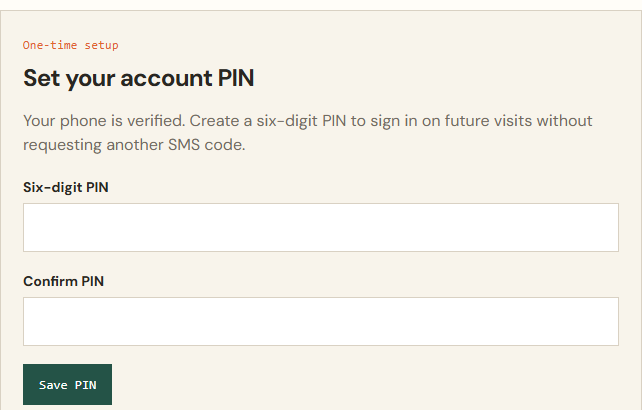
Start free setup to create your account. Campfire SMS sends a verification code. Choose and confirm a six-digit account PIN; later sign-ins use your phone number and PIN.
Run your installation command
Sign in, go to Add computers, open Add a computer or Bot, give the computer a label, and choose Create install command. Your account then shows the command with your installation code. Copy it and run it on the computer where your agent runs:
Installing on Linux or a VM? Do this first.
Run setup as the same non-root user that runs the agent. Use Python 3.12+ with venv support and activate an isolated environment before running the one-time command:
python3 -m venv "$HOME/.local/share/campfire/venv"
. "$HOME/.local/share/campfire/venv/bin/activate"
# Now run the npx setup command from your account.
Do not use
sudo pip, global/system pip, or--break-system-packages. If venv support is missing, have the VM administrator install the matching Python venv package.Set the MCP server command to the virtual environment’s absolute Python path, such as
/home/agent/.local/share/campfire/venv/bin/python -m campfire_mcp.cli serve. Future runs do not inherit shell activation.npx -y @campfiresms/setup YOUR_INSTALLATION_CODEThe command is single use and expires after 10 minutes. If it expires, create a new one.
Connect your agent
Setup stores the installation credential locally and registers detected Codex and Grok Build CLIs. For another compatible agent, add a local MCP server named
campfireusing the command printed by setup. Open or restart the agent.Test both directions
Send the account’s test message and reply TEST. Wait for the setup confirmation. Then ask your running agent to open a bridge, text you, retrieve a harmless reply, and respond.
For client-specific steps, use Codex SMS setup or Claude Code SMS setup. Use the local-agent notifications guide to choose when the agent should text, or the away-from-desk guide to prepare a task.
Account verification and installations
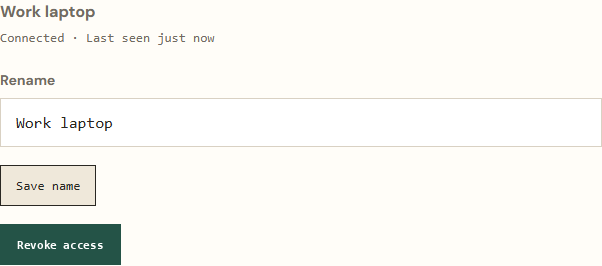
These screenshots show the account interface with fictional sample data.
Update or recover a local connection
If an installation command has expired or was already used, sign in and create a new one. If your saved credential is valid, refresh the local connector with:
npx -y @campfiresms/setup updateIf the credential was revoked or is missing, create a new installation instead. Restart the agent and test the message round trip. Check your account’s message balance if delivery still fails.
Revoke an installation
Sign in, find the installation under Add computers, and open Manage installation. Use Save name to identify it or Revoke access to disable its credential. For Grok Bot, disable wake and pause its routine first.
Remove a local connector
After revoking the installation, remove the MCP entry from each CLI you use:
codex mcp remove campfire
grok mcp remove campfire
claude mcp remove campfire --scope user
For OpenCode, delete the campfire entry from the mcp section of your OpenCode config (usually ~/.config/opencode/opencode.json, or opencode.json in your project). For any other MCP host, remove the campfire server in its MCP settings.
See pricing and message counting for plan and credit options.